Page 1 of 2
Possible bug in Listview & weight
Posted: Sat Feb 20, 2021 9:36 pm
by mrupp
Hi there
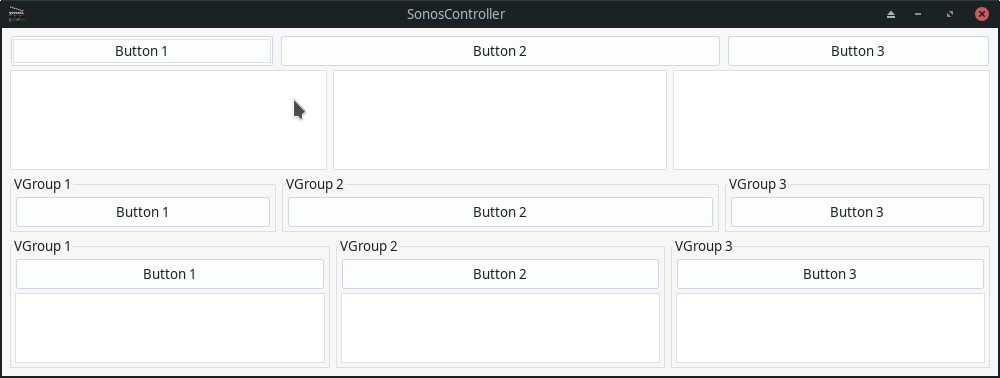
I might have found a bug concerning Listview and the use of weight either directly with the Listview or in the parent group of a Listview. The XML for the GUI is simple enough and looks like this:
Code: Select all
<?xml version="1.0" encoding="iso-8859-1"?>
<application id="app">
	<window id="mainWindow" title="SonosController" width="1000" height="300" >
		<vgroup>
			<hgroup>
				<button>Button 1</button>
				<button weight="200">Button 2</button>
				<button>Button 3</button>
			</hgroup>
			<hgroup>
				<listview>
					<column/>
				</listview>
				<listview weight="200">
					<column/>
				</listview>
				<listview>
					<column/>
				</listview>
			</hgroup>
			<hgroup>
				<vgroup frame="true" frametitle="VGroup 1">
					<button>Button 1</button>
				</vgroup>
				<vgroup frame="true" frametitle="VGroup 2" weight="200">
					<button>Button 2</button>
				</vgroup>
				<vgroup frame="true" frametitle="VGroup 3">
					<button>Button 3</button>
				</vgroup>
			</hgroup>
			<hgroup>
				<vgroup frame="true" frametitle="VGroup 1">
					<button>Button 1</button>
					<listview>
						<column/>
					</listview>
				</vgroup>
				<vgroup frame="true" frametitle="VGroup 2" weight="200">
					<button>Button 2</button>
					<listview>
						<column/>
					</listview>
				</vgroup>
				<vgroup frame="true" frametitle="VGroup 3">
					<button>Button 3</button>
					<listview>
						<column />
					</listview>
				</vgroup>
			</hgroup>
		</vgroup>
	</window>
</application>
The script itself is as simple as it gets:
Code: Select all
@REQUIRE "RapaGUI", {Link = True}
@APPTITLE "RapaGUI-Test"
@FILE 1, "TestGUI.xml"

moai.CreateApp(ReadString(1))

Repeat
	 WaitEvent
Forever
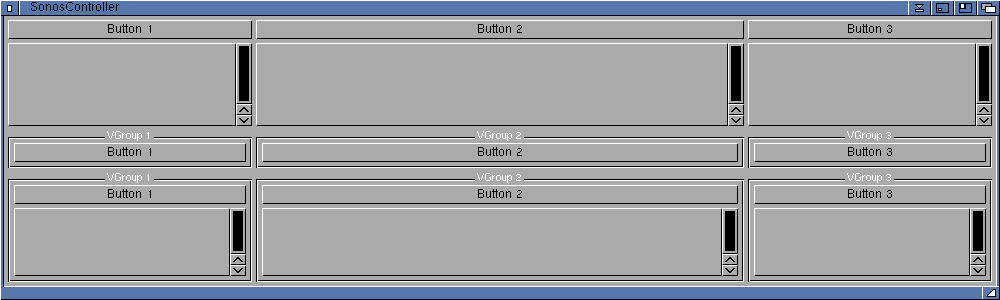
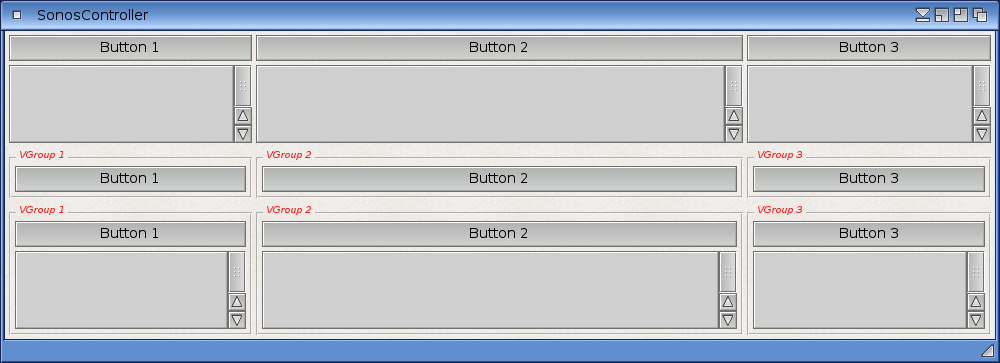
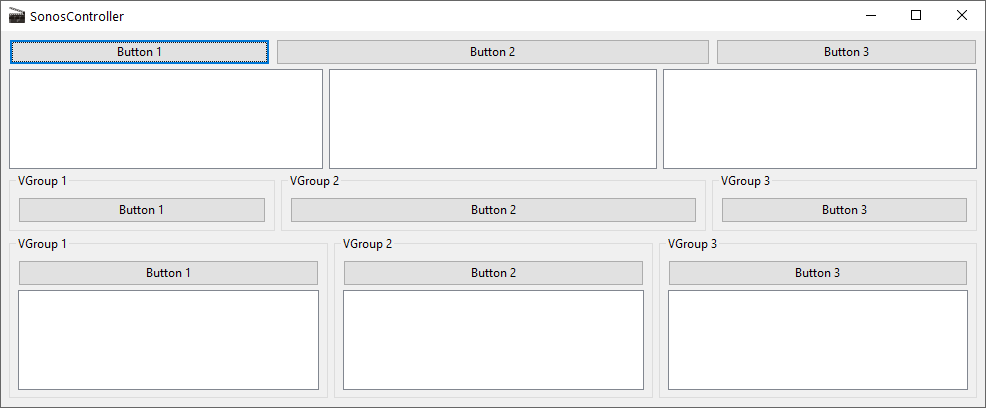
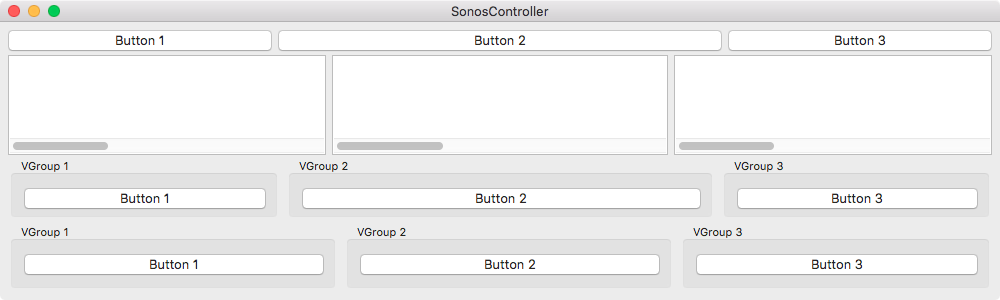
Now, this works perfectly well with MUI on AmigaOS3 and 4, but not on Windows and not on macOS, either. The buttons are correctly sized, the groups containing buttons, too, but not the Listviews and not the groups that contain a Listview:
AmigaOS3.9, MUI 3.9:
AmigaOS4.1 FEu2, MUI 5.0:
Window x64:
macOS x64:
Re: Possible bug in Listview & weight
Posted: Sat Feb 20, 2021 10:02 pm
by SamuraiCrow
One workaround would be to use a Colgroup to align gadgets vertically from each other. I'm not sure if you can weight the center column twice as wide though.
Code: Select all
<?xml version="1.0" encoding="iso-8859-1"?>
<application id="app">
	<window id="mainWindow" title="SonosController" width="1000" height="300" >
		<vgroup>
			<colgroup columns="3">
				<button>Button 1</button>
				<button weight="200">Button 2</button>
				<button>Button 3</button>

				<listview>
					<column/>
				</listview>
				<listview weight="200">
					<column/>
				</listview>
				<listview>
					<column/>
				</listview>

				<vgroup frame="true" frametitle="VGroup 1">
					<button>Button 1</button>
				</vgroup>
				<vgroup frame="true" frametitle="VGroup 2" weight="200">
					<button>Button 2</button>
				</vgroup>
				<vgroup frame="true" frametitle="VGroup 3">
					<button>Button 3</button>
				</vgroup>

				<vgroup frame="true" frametitle="VGroup 1">
					<button>Button 1</button>
					<listview>
						<column/>
					</listview>
				</vgroup>
				<vgroup frame="true" frametitle="VGroup 2" weight="200">
					<button>Button 2</button>
					<listview>
						<column/>
					</listview>
				</vgroup>
				<vgroup frame="true" frametitle="VGroup 3">
					<button>Button 3</button>
					<listview>
						<column />
					</listview>
				</vgroup>
			</colgroup>
		</vgroup>
	</window>
</application>
Re: Possible bug in Listview & weight
Posted: Sat Feb 20, 2021 10:38 pm
by SamuraiCrow
Before with original XML:
After with Colgroup XML:
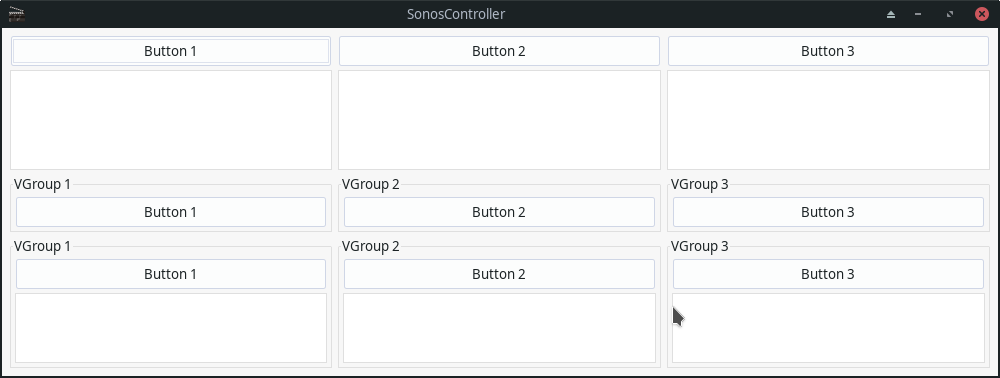
Tested on GTK+ on Linux. (MUI 5 on MorphOS was the same before and after as AmigaOS.)
Re: Possible bug in Listview & weight
Posted: Sat Feb 20, 2021 11:00 pm
by SamuraiCrow
I tried to set the unweighted elements to 100 but it didn't make a difference at all to the Linux version. It appears that the weights on the wxWidgets versions of RapaGUI have the groups off-kilter.
Re: Possible bug in Listview & weight
Posted: Sat Feb 20, 2021 11:29 pm
by mrupp
Thanks for your input. Unfortunately, colgroups are not of much use here because they can't be weighted (as it seems).
But anyway, this isn't the layout of my app at all, that one is more complex and nested. This one was only ment to demonstrate this possible bug in weighting.
Re: Possible bug in Listview & weight
Posted: Sun Feb 21, 2021 2:42 am
by SamuraiCrow
In MorphOS, the Colgroup did support weights. It looked identical to the first try. It was the same layout as AmigaOS 4.x.
Re: Possible bug in Listview & weight
Posted: Sun Feb 21, 2021 10:55 am
by mrupp
Alright, I tried out some things and found out, that setting a width="1" has an influence over the output, and suprisingly it seems to have a positive effect on the outcome.
Now, I did quite a bit of testing and measuring and this is the result:
- There seems definitely to be something wrong because even the buttons that seemed OK at first sight are off quite a bit when properly measuring them. Setting width="1" seems to help, but as soon as they are in a group, they are off again.
- Best outcome have the Listviews with width="1", but as soon as they are in a group, they are off, too. And it seems to have an influence if the buttons in the same group have width="1" or not.
- Setting width and weight might seem contradictory, but as long as fixWidth is not set, I seems that width is used as minimum width when resizing the window. Although the docs aren't mentioning this in the "Area.Width" entry, that's how it works with MUI, at least, and it makes totally sense, imho.
I strongly hope this helps Andreas in figuring out what's going on.
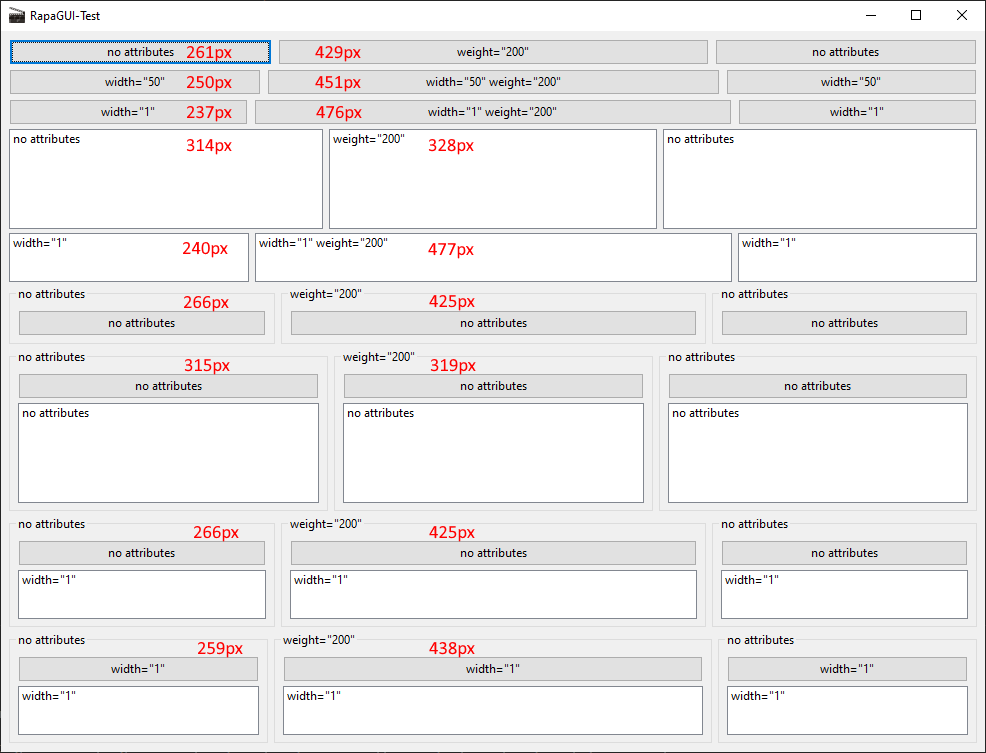
With MUI, everything looks as I would expect it to look:
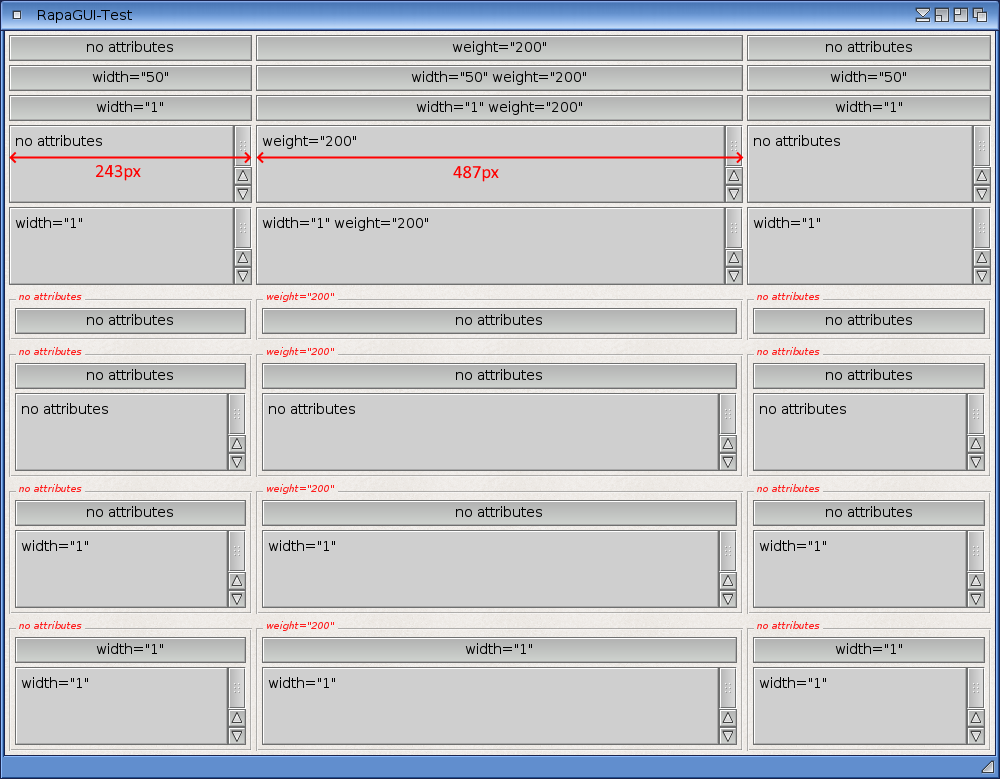
And Here's the new XML:
Code: Select all
<?xml version="1.0" encoding="iso-8859-1"?>
<application id="app">
	<window id="mainWindow" title="RapaGUI-Test" width="1000" >
		<vgroup>
			<hgroup>
				<button>no attributes</button>
				<button weight="200">weight="200"</button>
				<button>no attributes</button>
			</hgroup>
			<hgroup>
				<button width="50">width="50"</button>
				<button width="50" weight="200">width="50" weight="200"</button>
				<button width="50">width="50"</button>
			</hgroup>
			<hgroup>
				<button width="0">width="1"</button>
				<button width="0" weight="200">width="1" weight="200"</button>
				<button width="0">width="1"</button>
			</hgroup>
			<hgroup>
				<listview>
					<column>
						<item>no attributes</item>
					</column>
				</listview>
				<listview weight="200">
					<column>
						<item>weight="200"</item>
					</column>
				</listview>
				<listview>
					<column>
						<item>no attributes</item>
					</column>
				</listview>
			</hgroup>
			<hgroup>
				<listview width="1">
					<column>
						<item>width="1"</item>
					</column>
				</listview>
				<listview width="1" weight="200">
					<column>
						<item>width="1" weight="200"</item>
					</column>
				</listview>
				<listview width="1">
					<column>
						<item>width="1"</item>
					</column>
				</listview>
			</hgroup>
			<hgroup>
				<vgroup frame="true" frametitle="no attributes">
					<button>no attributes</button>
				</vgroup>
				<vgroup frame="true" frametitle='weight="200"' weight="200">
					<button>no attributes</button>
				</vgroup>
				<vgroup frame="true" frametitle="no attributes">
					<button>no attributes</button>
				</vgroup>
			</hgroup>
			<hgroup>
				<vgroup frame="true" frametitle="no attributes">
					<button>no attributes</button>
					<listview>
						<column>
							<item>no attributes</item>
						</column>
					</listview>
				</vgroup>
				<vgroup frame="true" frametitle='weight="200"' weight="200">
					<button>no attributes</button>
					<listview>
						<column>
							<item>no attributes</item>
						</column>
					</listview>
				</vgroup>
				<vgroup frame="true" frametitle="no attributes">
					<button>no attributes</button>
					<listview>
						<column>
							<item>no attributes</item>
						</column>
					</listview>
				</vgroup>
			</hgroup>
			<hgroup>
				<vgroup frame="true" frametitle="no attributes">
					<button>no attributes</button>
					<listview width="1">
						<column>
							<item>width="1"</item>
						</column>
					</listview>
				</vgroup>
				<vgroup frame="true" frametitle='weight="200"' weight="200">
					<button>no attributes</button>
					<listview width="1">
						<column>
							<item>width="1"</item>
						</column>
					</listview>
				</vgroup>
				<vgroup frame="true" frametitle="no attributes">
					<button>no attributes</button>
					<listview width="1">
						<column>
							<item>width="1"</item>
						</column>
					</listview>
				</vgroup>
			</hgroup>
			<hgroup>
				<vgroup frame="true" frametitle="no attributes">
					<button width="1">width="1"</button>
					<listview width="1">
						<column>
							<item>width="1"</item>
						</column>
					</listview>
				</vgroup>
				<vgroup frame="true" frametitle='weight="200"' weight="200">
					<button width="1">width="1"</button>
					<listview width="1">
						<column>
							<item>width="1"</item>
						</column>
					</listview>
				</vgroup>
				<vgroup frame="true" frametitle="no attributes">
					<button width="1">width="1"</button>
					<listview width="1">
						<column>
							<item>width="1"</item>
						</column>
					</listview>
				</vgroup>
			</hgroup>
		</vgroup>
	</window>
</application>
Re: Possible bug in Listview & weight
Posted: Tue Feb 23, 2021 7:52 pm
by airsoftsoftwair
RapaGUI 2.0 has seen several fixes concerning weight and it looks like they also affect this issue. With RapaGUI 2.0 your GUI looks fine on Windows so I think this has been fixed already. Here is what it looks like with RapaGUI 2.0:

And here's the history entry from last Summer:
Code: Select all
- Change [Windows/macOS/Linux/Android]: Area.Weight is now handled better; it's still not completely the
  same as with MUI but we're pretty close now which should be sufficient for most cases; note that when
  setting Area.Weight you normally shouldn't set specific dimensions via Area.Width/Height; these should
  be determined by the Area.Weight setting
Re: Possible bug in Listview & weight
Posted: Tue Feb 23, 2021 8:44 pm
by mrupp
Excellent. Could you give the more complex XML (the last one I posted) a go, too, and post a screenshot here, please?
Re: Possible bug in Listview & weight
Posted: Tue Feb 23, 2021 9:26 pm
by airsoftsoftwair
This is what it looks like:

Is this correct?